Fog gives the appeareance of distant objects fading out into the distance. Fog is quite easy to implement, as we have depth information for all on-screen pixels! With that, we can change the color of a pixel depending on the distance from the player.
But first - our composite.fsh file is getting a bit big. Let’s create a new pair of files - composite1.vsh and composite1.fsh. These will run after composite!
Let’s start fresh:
#version 330 compatibility
out vec2 texcoord;
void main() {  gl_Position = ftransform();  texcoord = (gl_TextureMatrix[0] * gl_MultiTexCoord0).xy;}
The vertex shader is exactly the same as composite.vsh, as we’re not really doing much there. The fragment shader, however, will be different!
#version 330 compatibility
uniform sampler2D colortex0;uniform sampler2D depthtex0;
uniform mat4 gbufferProjectionInverse;
in vec2 texcoord;
vec3 projectAndDivide(mat4 projectionMatrix, vec3 position){  vec4 homPos = projectionMatrix * vec4(position, 1.0);  return homPos.xyz / homPos.w;}
/* RENDERTARGETS: 0 */layout(location = 0) out vec4 color;
void main() {  color = texture(colortex0, texcoord);
  float depth = texture(depthtex0, texcoord).r;  if (depth == 1.0){    return;  }
  vec3 ndcPos = vec3(texcoord.xy, depth) * 2.0 - 1.0;  vec3 viewPos = projectAndDivide(gbufferProjectionInverse, ndcPos);}
You’ll notice that we kept some of the code we’ve defined before in composite.fsh. We’ll need them when computing fog. It’s generally a good idea to reduce code duplication by moving functions like projectAndDivide to separate files, like /lib/util.glsl! When your shader is going to become more complex, consider moving re-used code to .glsl files.
The Fog is Coming
Section titled “The Fog is Coming”Fog only appears in distant areas. Let’s use the far uniform to see what we consider as the furthest point from the player. That uniform is basically just the render distance, in blocks! As the distance from the camera to the terrain approaches far, we should transition to our fog color.
Here’s how we do that with GLSL:
#version 330 compatibility
uniform sampler2D colortex0;uniform sampler2D depthtex0;
uniform mat4 gbufferProjectionInverse; uniform vec3 fogColor; uniform float far;
in vec2 texcoord;
vec3 projectAndDivide(mat4 projectionMatrix, vec3 position){  vec4 homPos = projectionMatrix * vec4(position, 1.0);  return homPos.xyz / homPos.w;}
/* RENDERTARGETS: 0 */layout(location = 0) out vec4 color;
void main() {  color = texture(colortex0, texcoord);
  float depth = texture(depthtex0, texcoord).r;  if (depth == 1.0){    return;  }
  vec3 ndcPos = vec3(texcoord.xy, depth) * 2.0 - 1.0;  vec3 viewPos = projectAndDivide(gbufferProjectionInverse, ndcPos);
 color.rgb = mix(color.rgb, pow(fogColor, vec3(2.2)), length(viewPos) / far);}
We raise fogColor to the power of 2.2 to account for the gamma correction applied to the sky. As we’re using the default vanilla sky, we can use the Minecraft-defined fogColor - however, if, on your journey, you decide to write your own sky rendering, you can choose any other color you’d like!
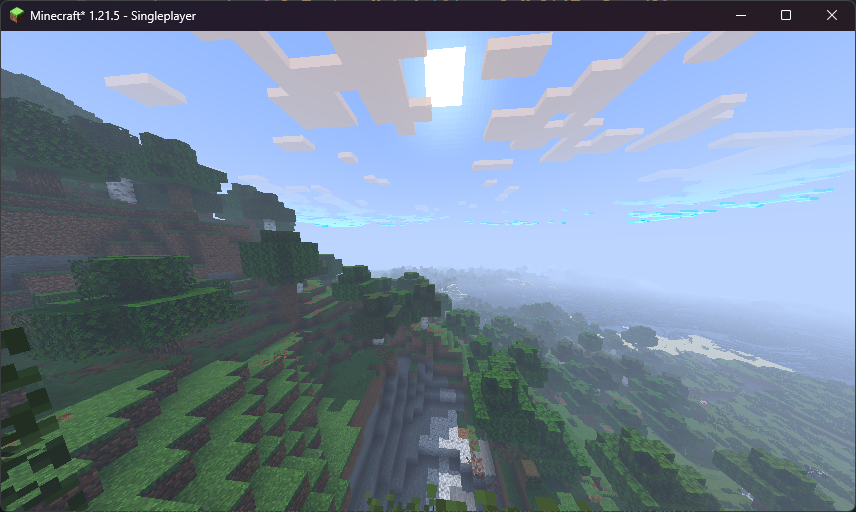
The fog works! Actually… it works a little too well. There’s too much fog! This is because the fog increases linearly as distant objects appear. We want it to only kick in when the objects are very far away. We can fix this by using an exponential function!
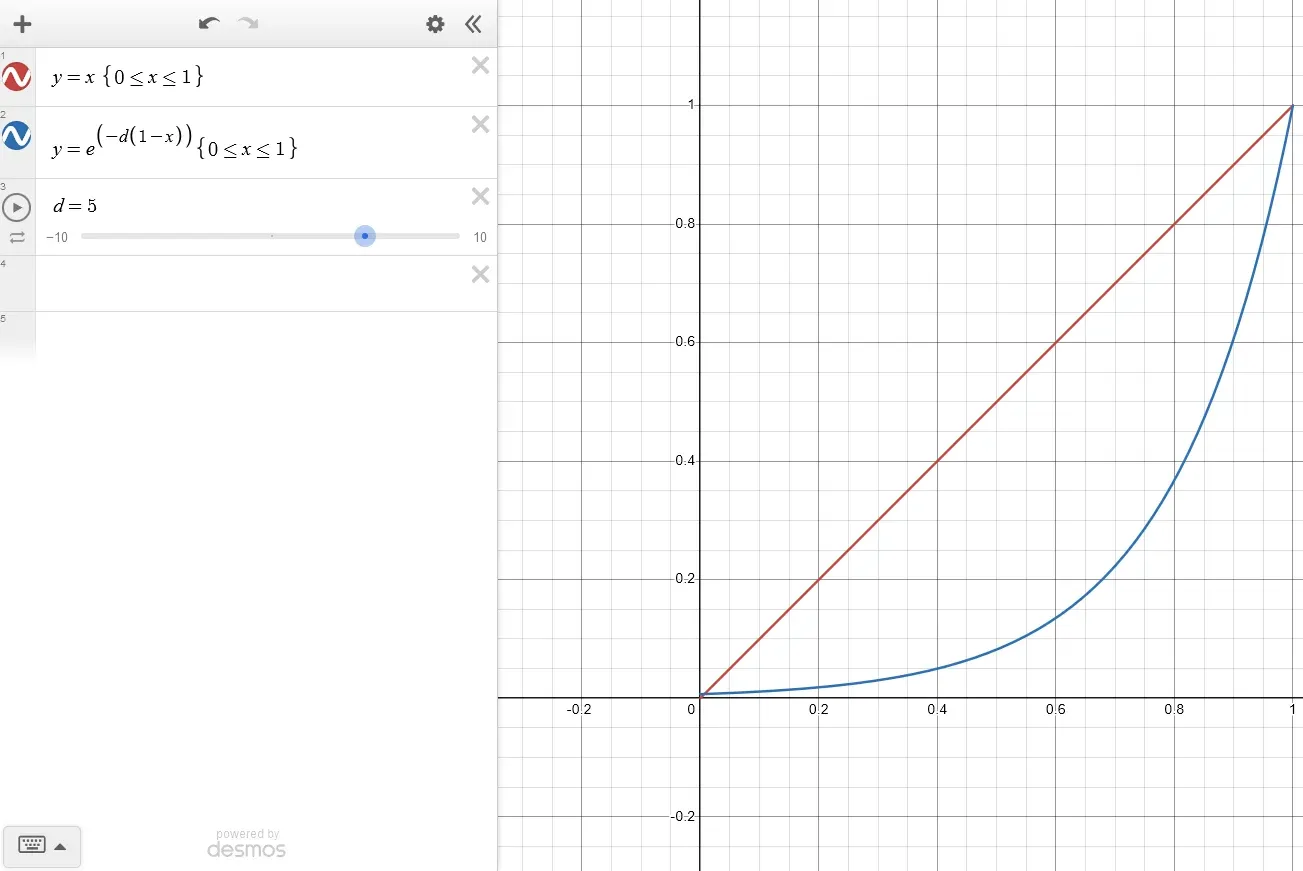
This is a graph where X is the distance, and Y is the fog amount. We currently are using the red function - we want to have something more similar to the blue one. Let’s define it!
#version 330 compatibility
uniform sampler2D colortex0;uniform sampler2D depthtex0;
uniform mat4 gbufferProjectionInverse;uniform vec3 fogColor;uniform float far;
in vec2 texcoord;
 const int FOG_DENSITY = 5.0;
vec3 projectAndDivide(mat4 projectionMatrix, vec3 position){  vec4 homPos = projectionMatrix * vec4(position, 1.0);  return homPos.xyz / homPos.w;}
/* RENDERTARGETS: 0 */layout(location = 0) out vec4 color;
void main() {  color = texture(colortex0, texcoord);
  float depth = texture(depthtex0, texcoord).r;  if (depth == 1.0){    return;  }
  vec3 ndcPos = vec3(texcoord.xy, depth) * 2.0 - 1.0;  vec3 viewPos = projectAndDivide(gbufferProjectionInverse, ndcPos);
 float dist = length(viewPos) / far; float fogFactor = exp(-FOG_DENSITY * (1.0 - dist));
 color.rgb = mix(color.rgb, pow(fogColor, vec3(2.2)), length(viewPos) / far); color.rgb = mix(color.rgb, pow(fogColor, vec3(2.2)), clamp(fogFactor, 0.0, 1.0));}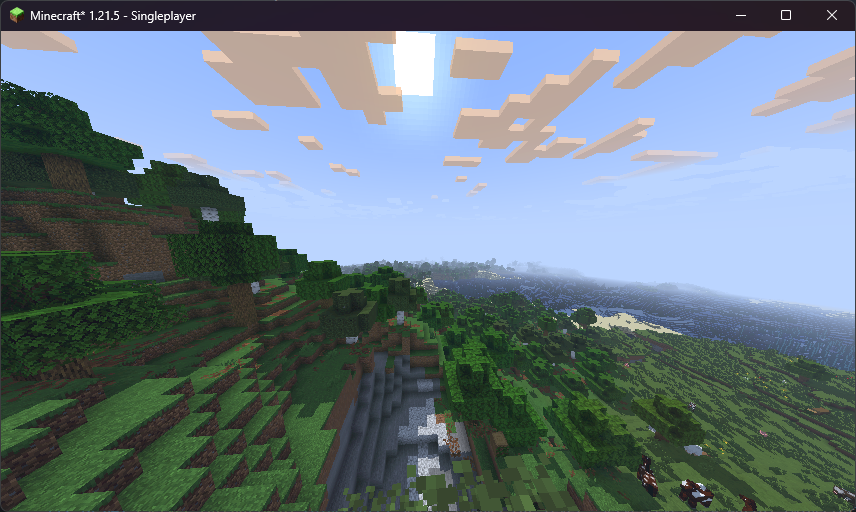
That looks about right!