Now that we know how Minecraft renders stuff, we can proceed with implementing semi-realistic lighting. We’ll use the diffuse lighting model - you can read more into the math of that here.
We’ll be doing deferred rendering - deferring all lighting work to the last composite program instead of doing them directly in the gbuffer programs. The main benefit for this is performance - we only do lighting calculations for what’s actually on screen. We do this by saving all the data we need to our render targets we discussed in the previous chapter!
The first thing we need is to access the light levels. Let’s write those to buffer #1 from gbuffers_terrain.fsh:
 #version 330 compatibility
 uniform sampler2D lightmap; uniform sampler2D gtexture;
 uniform float alphaTestRef = 0.1;
 in vec2 lmcoord; in vec2 texcoord; in vec4 glcolor;
 /* RENDERTARGETS: 0 */ /* RENDERTARGETS: 0,1 */ layout(location = 0) out vec4 color; layout(location = 1) out vec4 lightLevelData;
void main() {  color = texture(gtexture, texcoord) * glcolor;  color *= texture(lightmap, lmcoord);
  lightLevelData = vec4(lmcoord, 0.0, 1.0); // this will write to buffer #1, as we defined above!
    if (color.a < alphaTestRef) {        discard;    } }
…and we can then access that from composite.fsh!
 #version 330 compatibility
 uniform sampler2D colortex0; uniform sampler2D colortex1;
 in vec2 texcoord;
 /* RENDERTARGETS: 0 */ layout(location = 0) out vec4 color;
void main() {  color = texture(colortex0, texcoord);   vec2 lightmap = texture(colortex1, texcoord).xy;   color.rgb = vec3(lightmap, 0.0); // just to see if it works!}
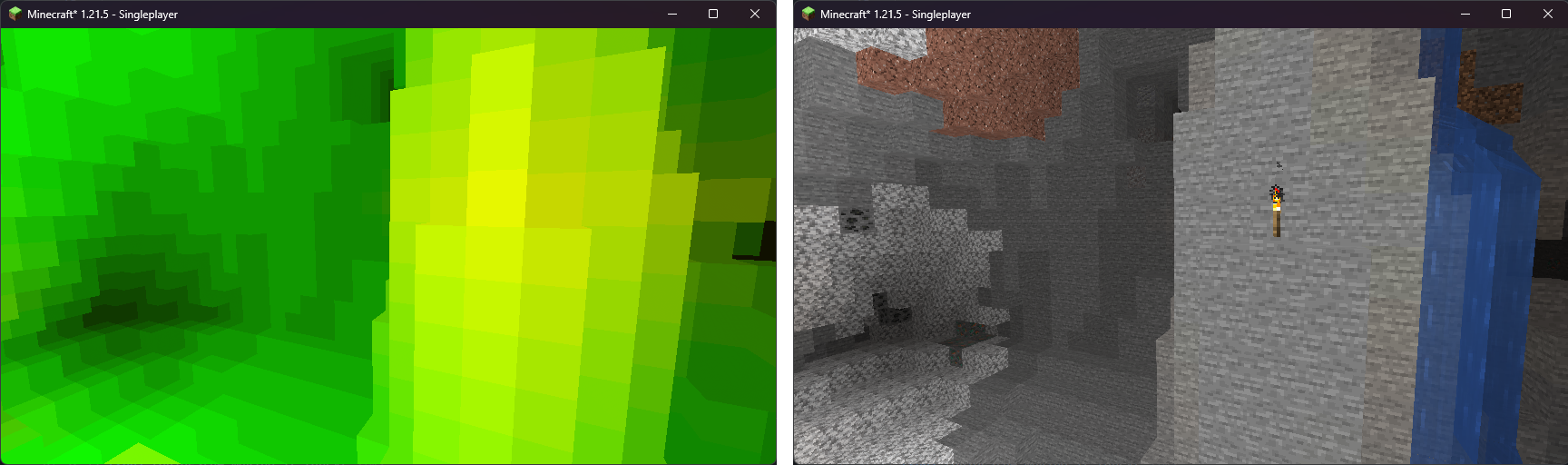
We just made a lightmap! On the left, we have the lightmap, and on the right, we have how the world looks normally.
Normal vectors
Section titled “Normal vectors”A normal is a vector that’s perpendicular to a plane. Let’s take a look at this block:
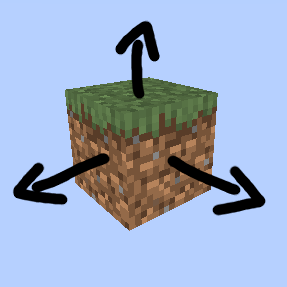
The arrows are the normal vectors for each face! So - basically, a normal is the vector that determines the “direction” of a face. Normals are extremely handy for approximating realistic lighting.
We can store these vectors in one of our buffers, so that we can access it from composite! Let’s first calculate these vectors in gbuffers_terrain.vsh, as the normals are contained in the vertex information.
#version 330 compatibility
 out vec2 lmcoord; out vec2 texcoord; out vec4 glcolor; out vec3 normal;
 // Remember uniforms from before? This is calculated on the CPU, and available for any program! // We just tell GLSL we want to use this uniform. It always exists, no matter if we define it here. uniform mat4 gbufferModelViewInverse;
void main() {  gl_Position = ftransform();  texcoord = (gl_TextureMatrix[0] * gl_MultiTexCoord0).xy;  lmcoord = (gl_TextureMatrix[1] * gl_MultiTexCoord1).xy;  glcolor = gl_Color;
   normal = gl_NormalMatrix * gl_Normal; // this gives us the normal in view space   normal = mat3(gbufferModelViewInverse) * normal; // this converts the normal to world/player space}
The normal vector is stored in gl_Normal - but it’s stored in model space. It refers to the individual object’s origin - we’ll discuss this later, but for now, all you need to know is that we need it in player space instead. To do that, we multiply it by gbufferModelViewInverse.
Now, the normal is passed through to the fragment shader - from there, we’ll pass it over to buffer #2!
 #version 330 compatibility
 uniform sampler2D lightmap; uniform sampler2D gtexture;
 uniform float alphaTestRef = 0.1;
 in vec2 lmcoord; in vec2 texcoord; in vec4 glcolor; in vec3 normal;
 /* RENDERTARGETS: 0,1 */ /* RENDERTARGETS: 0,1,2 */ layout(location = 0) out vec4 color; layout(location = 1) out vec4 lightLevelData; layout(location = 2) out vec4 encodedNormal;
void main() {  color = texture(gtexture, texcoord) * glcolor;  color *= texture(lightmap, lmcoord);
   lightLevelData = vec4(lmcoord, 0.0, 1.0); // this will write to buffer #1, as we defined above!   encodedNormal = vec4(normal * 0.5 + 0.5, 1.0); // [-1.0, 1.0] to [0.0, 1.0]
    if (color.a < alphaTestRef) {        discard;    } }
Note how we convert the normal from [-1.0, 1.0] to [0.0, 1.0] here. This is a render target limitation, and was mentioned in the previous chapter. Let’s reverse that conversion when we read it back from the buffer.
 #version 330 compatibility
 uniform sampler2D colortex0; uniform sampler2D colortex1; uniform sampler2D colortex2;
 in vec2 texcoord;
 /* RENDERTARGETS: 0 */ layout(location = 0) out vec4 color;
void main() {    vec2 lightmap = texture(colortex1, texcoord).xy;   vec3 encodedNormal = texture(colortex2, texcoord).rgb;   vec3 normal = normalize((encodedNormal - 0.5) * 2.0);
  color.rgb = vec3(lightmap, 0.0); // just to see if it works!  color.rgb = normal; // just to see if it works!}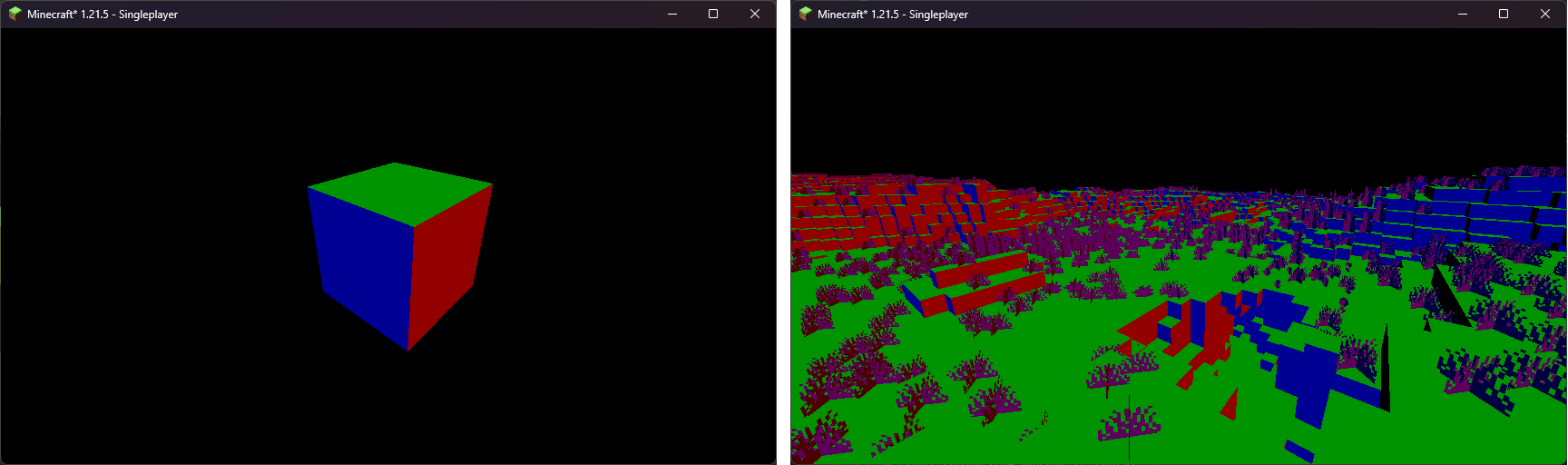
That looks about right! Green is (0, 1, 0) - which means Y = 1, so facing up - and all of our surfaces that face up are green. Similar story to blue (0, 0, 1) and red (1, 0, 0).
Lighting
Section titled “Lighting”Now, to the good stuff! We want to apply actual lighting/shading to the textures of the blocks that make up the terrain. In real life, we have a lot of light sources that influence lighting - for our first shader, we’ll have the following sources:
- ambient light: a light source that’s “everywhere”. You’ll see this in caves, for example.
- sky light: we get this from the lightmap. This will be our indirect lighting.
- block light: torches, furnaces, etc - we get this from the lightmap.
- sun light and moon light: this is a fancy one! We will make this change with the time of day.
Let’s define the colors for each light source:
const vec3 blocklightColor = vec3(1.0, 0.5, 0.08);const vec3 skylightColor = vec3(0.05, 0.15, 0.3);const vec3 sunlightColor = vec3(1.0);const vec3 ambientColor = vec3(0.1);You can place this right below the uniform’s in composite.fsh. In that file, let’s apply the colors:
 #version 330 compatibility
 uniform sampler2D colortex0; uniform sampler2D colortex1; uniform sampler2D colortex2;
 const vec3 blocklightColor = vec3(1.0, 0.5, 0.08); const vec3 skylightColor = vec3(0.05, 0.15, 0.3); const vec3 sunlightColor = vec3(1.0); const vec3 ambientColor = vec3(0.1);
 in vec2 texcoord;
 /* RENDERTARGETS: 0 */ layout(location = 0) out vec4 color;
void main() {    vec2 lightmap = texture(colortex1, texcoord).xy;    vec3 encodedNormal = texture(colortex2, texcoord).rgb;    vec3 normal = normalize((encodedNormal - 0.5) * 2.0);
   color = texture(colortex0, texcoord);
   vec3 blocklight = lightmap.x * blocklightColor;   vec3 skylight = lightmap.y * skylightColor;   vec3 ambient = ambientColor;   vec3 sunlight = sunlightColor; // we'll fix this in a minute!
  color.rgb = normal; // just to see if it works!   color.rgb *= blocklight + skylight + ambient + sunlight;}
Now - as we’re doing our own shading, we don’t want to apply Minecraft’s default light colors. Let’s remove that - open gbuffers_terrain.fsh, and remove the lightmap sample:
 #version 330 compatibility
 uniform sampler2D lightmap; uniform sampler2D gtexture;
 uniform float alphaTestRef = 0.1;
 in vec2 lmcoord; in vec2 texcoord; in vec4 glcolor;
 /* RENDERTARGETS: 0,1 */ layout(location = 0) out vec4 color; layout(location = 1) out vec4 lightLevelData;
void main() {  color = texture(gtexture, texcoord) * glcolor;  color *= texture(lightmap, lmcoord);
   lightLevelData = vec4(lmcoord, 0.0, 1.0); // this will write to buffer #1, as we defined above!
    if (color.a < alphaTestRef) {        discard;    } }
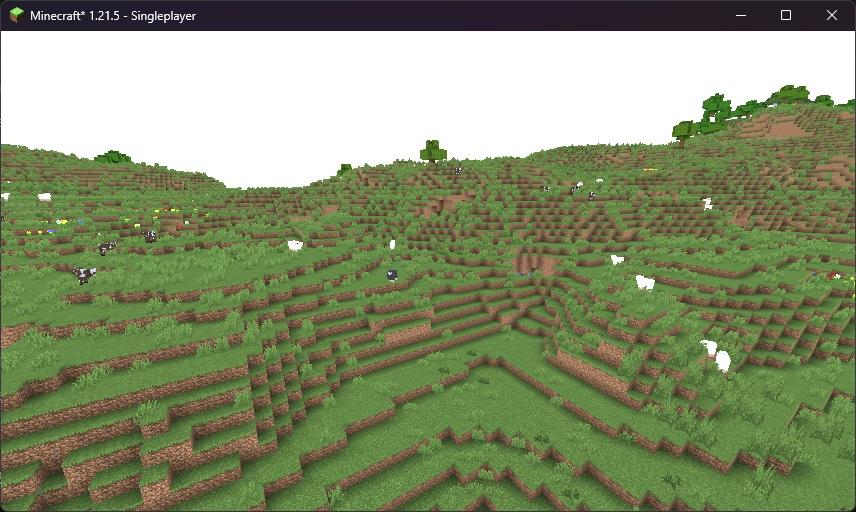
You should get a result that looks a bit like this (make sure to turn on Smooth Lighting in your settings!):
Sunlight
Section titled “Sunlight”This is where we diverge from the Minecraft’s built-in shading model. If something is facing directly towards the sun, we want it to be fully sunlit - and vice versa. So - we need a function that returns 1.0 if two vectors are facing in the same direction, and 0.0 if they are facing away from each other. If only there was such a function…
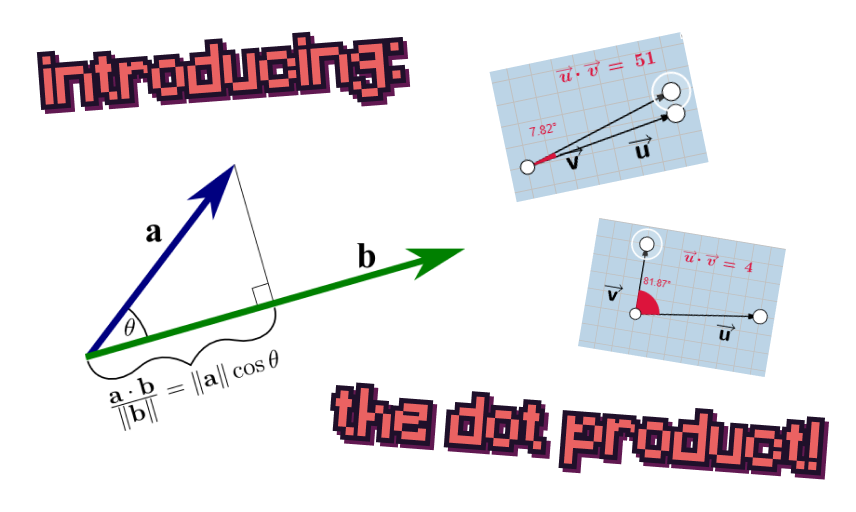
We can use a dot product! It fits right in with what we need. Now, to get the position of the sun or the moon, we can use the shadowLightPosition uniform. We need to normalize this position in order to get a vector pointing toward said position. This will maintain the general position of the vector, but make the magnitude 1!
The normals we got for the terrain are, however, in world space. The normal of the sun/moon is in view space. We need to convert view space into world space - and, just as we did before, we use the gbufferModelViewInverse uniform again!
#version 330 compatibility
uniform sampler2D colortex0;uniform sampler2D colortex1;uniform sampler2D colortex2;
 uniform vec3 shadowLightPosition; uniform mat4 gbufferModelViewInverse;
const vec3 blocklightColor = vec3(1.0, 0.5, 0.08);const vec3 skylightColor = vec3(0.05, 0.15, 0.3);const vec3 sunlightColor = vec3(1.0);const vec3 ambientColor = vec3(0.1);
in vec2 texcoord;
/* RENDERTARGETS: 0 */layout(location = 0) out vec4 color;
void main() {  vec2 lightmap = texture(colortex1, texcoord).xy;  vec3 encodedNormal = texture(colortex2, texcoord).rgb;  vec3 normal = normalize((encodedNormal - 0.5) * 2.0);  vec3 lightVector = normalize(shadowLightPosition);  vec3 worldLightVector = mat3(gbufferModelViewInverse) * lightVector;
  color = texture(colortex0, texcoord);
  vec3 blocklight = lightmap.x * blocklightColor;  vec3 skylight = lightmap.y * skylightColor;  vec3 ambient = ambientColor;  vec3 sunlight = sunlightColor; // we'll fix this in a minute!  vec3 sunlight = sunlightColor * clamp(dot(worldLightVector, normal), 0.0, 1.0) * lightmap.y;
  color.rgb *= blocklight + skylight + ambient + sunlight;}
The sky is falling!
Section titled “The sky is falling!”Right now, we’re trying to apply lighting to the sky, despite the fact we don’t have any normal or lightmap data for it. This is undefined behavior - different hardware reacts differently to this, but it might look like as if your Minecraft world is currently undergoing an apocalypse.
We can fix this by using the depth buffer! The depth buffer tells us how far away a pixel is. If the pixel is as far as it can possibly be, it’ll be 1.0 in the depth buffer.
The depth buffer is stored as the depthtex0 uniform.
#version 330 compatibility
uniform sampler2D colortex0;uniform sampler2D colortex1;uniform sampler2D colortex2; uniform sampler2D depthtex0;
uniform vec3 shadowLightPosition;uniform mat4 gbufferModelViewInverse;
const vec3 blocklightColor = vec3(1.0, 0.5, 0.08);const vec3 skylightColor = vec3(0.05, 0.15, 0.3);const vec3 sunlightColor = vec3(1.0);const vec3 ambientColor = vec3(0.1);
in vec2 texcoord;
/* RENDERTARGETS: 0 */layout(location = 0) out vec4 color;
void main() {  vec2 lightmap = texture(colortex1, texcoord).xy;  vec3 encodedNormal = texture(colortex2, texcoord).rgb;  vec3 normal = normalize((encodedNormal - 0.5) * 2.0);  vec3 lightVector = normalize(shadowLightPosition);  vec3 worldLightVector = mat3(gbufferModelViewInverse) * lightVector;
  color = texture(colortex0, texcoord);
   float depth = texture(depthtex0, texcoord).r;   if (depth == 1.0) {       return; // let's skip whats beneath us - the lighting apply logic!   }
  vec3 blocklight = lightmap.x * blocklightColor;  vec3 skylight = lightmap.y * skylightColor;  vec3 ambient = ambientColor;  vec3 sunlight = sunlightColor * clamp(dot(worldLightVector, normal), 0.0, 1.0) * lightmap.y;
  color.rgb *= blocklight + skylight + ambient + sunlight;}
After all of this, we should get something like this:
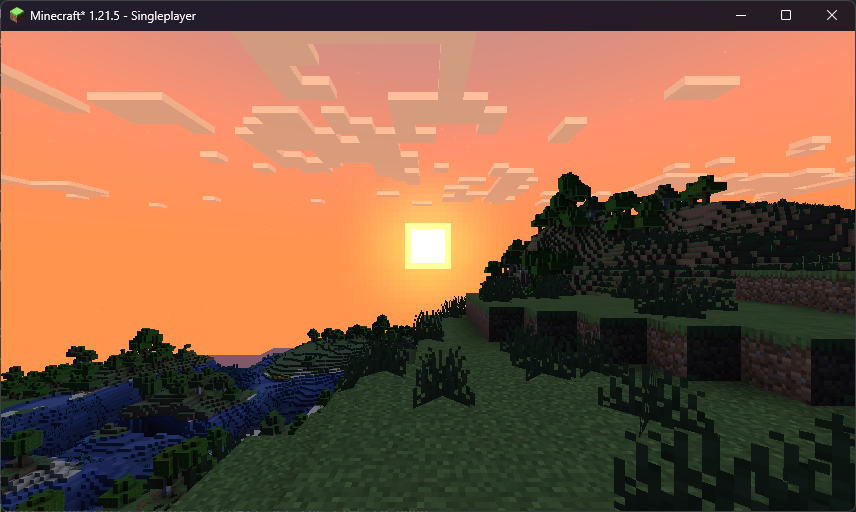
…this is a bit too dark, though! We need to do some gamma correction.
Gamma correction
Section titled “Gamma correction”Our eyes don’t percieve light linearly, but rather on a generally logarithmic scale. For example, the color that appears to your eyes as halfway between black and white actually only emits roughly 25% of the photons that white does. Because of this, computer images (such as Minecraft’s textures) are stored in the sRGB color space, which dedicates more precision to darker colors. Approximately, the color value stored on the computer is raised to the power of 1/2.2, which is known as gamma correction. When it comes for your monitor to display these colors to the screen, it raises the values back to the power of 2.2 - the inverse of the gamma correction - to emit the correct amount of photons.
When working with lighting effects, we want the actual brightness and not the human perception of the color. To achieve this, we can ourselves apply inverse gamma correction by raising the colors to the power of 2.2 before applying lighting effects. Just after we sample colortex0 in composite.fsh, let’s apply the following:
#version 330 compatibility
uniform sampler2D colortex0;uniform sampler2D colortex1;uniform sampler2D colortex2;uniform sampler2D depthtex0;
uniform vec3 shadowLightPosition;uniform mat4 gbufferModelViewInverse;
const vec3 blocklightColor = vec3(1.0, 0.5, 0.08);const vec3 skylightColor = vec3(0.05, 0.15, 0.3);const vec3 sunlightColor = vec3(1.0);const vec3 ambientColor = vec3(0.1);
in vec2 texcoord;
/* RENDERTARGETS: 0 */layout(location = 0) out vec4 color;
void main() {  vec2 lightmap = texture(colortex1, texcoord).xy;  vec3 encodedNormal = texture(colortex2, texcoord).rgb;  vec3 normal = normalize((encodedNormal - 0.5) * 2.0);  vec3 lightVector = normalize(shadowLightPosition);  vec3 worldLightVector = mat3(gbufferModelViewInverse) * lightVector;
  color = texture(colortex0, texcoord);   color.rgb = pow(color.rgb, vec3(2.2));
    float depth = texture(depthtex0, texcoord).r;    if (depth == 1.0) {        return; // let's skip whats beneath us - the lighting apply logic!    }
  vec3 blocklight = lightmap.x * blocklightColor;  vec3 skylight = lightmap.y * skylightColor;  vec3 ambient = ambientColor;  vec3 sunlight = sunlightColor * clamp(dot(worldLightVector, normal), 0.0, 1.0) * lightmap.y;
  color.rgb *= blocklight + skylight + ambient + sunlight;}
This converts our color to the linear color space. However, since monitors expect colors to be in the sRGB color space, we must reapply gamma correction before the color is output to the screen. To do this, let’s make a final pass by creating two new files - final.vsh and final.fsh. Both of these can be identical to our composite pass as it stands right now, except we will instead do:
#version 330 compatibility
uniform sampler2D colortex0;
in vec2 texcoord;
layout(location = 0) out vec4 color;
void main() {  color = texture(colortex0, texcoord);  color.rgb = pow(color.rgb, vec3(1.0 / 2.2));}
For final.vsh, we just need texcoord.
#version 330 compatibility
out vec2 texcoord;
void main() {  gl_Position = ftransform();  texcoord = (gl_TextureMatrix[0] * gl_MultiTexCoord0).xy;}
Because colortex buffers are designed to hold gamma corrected colors, you will lose some possible color values if you write linear color to them. We can solve this by simply increasing the precision of the buffer:
#version 330 compatibility
uniform sampler2D colortex0;uniform sampler2D colortex1;uniform sampler2D colortex2;uniform sampler2D depthtex0;
 /* const int colortex0Format = RGB16; */
uniform vec3 shadowLightPosition;uniform mat4 gbufferModelViewInverse;
const vec3 blocklightColor = vec3(1.0, 0.5, 0.08);const vec3 skylightColor = vec3(0.05, 0.15, 0.3);const vec3 sunlightColor = vec3(1.0);const vec3 ambientColor = vec3(0.1);
in vec2 texcoord;
/* RENDERTARGETS: 0 */layout(location = 0) out vec4 color;
void main() {  vec2 lightmap = texture(colortex1, texcoord).xy;  vec3 encodedNormal = texture(colortex2, texcoord).rgb;  vec3 normal = normalize((encodedNormal - 0.5) * 2.0);  vec3 lightVector = normalize(shadowLightPosition);  vec3 worldLightVector = mat3(gbufferModelViewInverse) * lightVector;
  color = texture(colortex0, texcoord);   color.rgb = pow(color.rgb, vec3(2.2));
    float depth = texture(depthtex0, texcoord).r;    if (depth == 1.0) {        return; // let's skip whats beneath us - the lighting apply logic!    }
  vec3 blocklight = lightmap.x * blocklightColor;  vec3 skylight = lightmap.y * skylightColor;  vec3 ambient = ambientColor;  vec3 sunlight = sunlightColor * clamp(dot(worldLightVector, normal), 0.0, 1.0) * lightmap.y;
  color.rgb *= blocklight + skylight + ambient + sunlight;}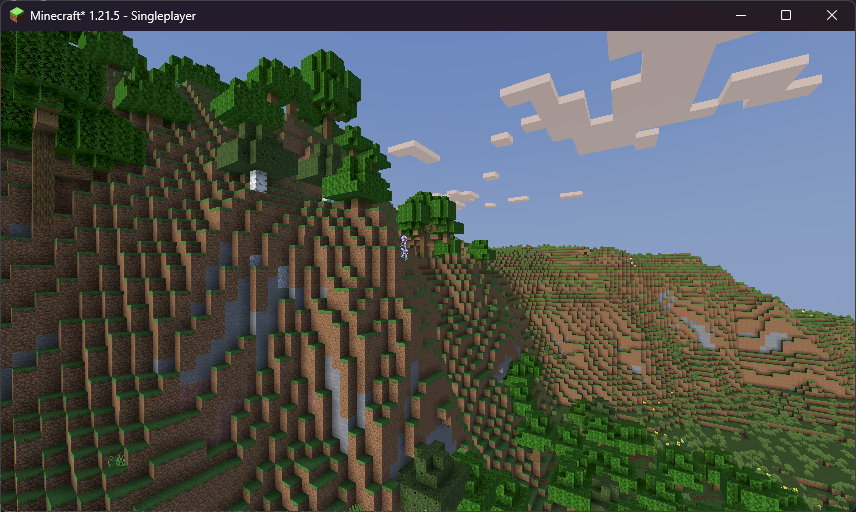
That looks quite nice already! In the next chapter, we’ll add shadows.