For most Minecraft shaders, shadows are implemented via something called shadow mapping. We render the world from the perspective of the sun/moon, storing color and depth information (how far a block is from the sun/moon).
To render a shadow-map, we’ll need to create two files: shadow.vsh and shadow.fsh.
#version 330 compatibility
out vec2 texcoord;out vec4 glcolor;
void main() { texcoord = (gl_TextureMatrix[0] * gl_MultiTexCoord0).xy; glcolor = gl_Color; gl_Position = ftransform();}#version 330 compatibility
uniform sampler2D gtexture;
in vec2 texcoord;in vec4 glcolor;
layout(location = 0) out vec4 color;
void main() { color = texture(gtexture, texcoord) * glcolor; if (color.a < 0.1){ discard; }}These are basically the same as gbuffers_terrain! Notice how there’s no RENDERTARGETS declaration in the fragment shader. This is because the buffers you write to from the shadow pass are predetermined, and you cannot write to colortex buffers from it. By writing to location 0, we are writing to shadowcolor0. By default, we can write to shadowcolor0 and shadowcolor1.
We now have Iris rendering a shadow map from the perspective of the sun/moon!
How does it look like?
Section titled “How does it look like?”Glad you asked. Let’s go to our final.fsh program to take a look. The shadow map is stored in shadowtex0 - so let’s add that to our final program and see how it looks like:
#version 330 compatibility
 uniform sampler2D colortex0; uniform sampler2D shadowtex0;
in vec2 texcoord;
layout(location = 0) out vec4 color;
void main() {  // This will show the raw shadow-map texture!  color.rgb = texture(shadowtex0, texcoord).rgb;  return;
  color = texture(colortex0, texcoord);  color.rgb = pow(color.rgb, vec3(1.0 / 2.2));}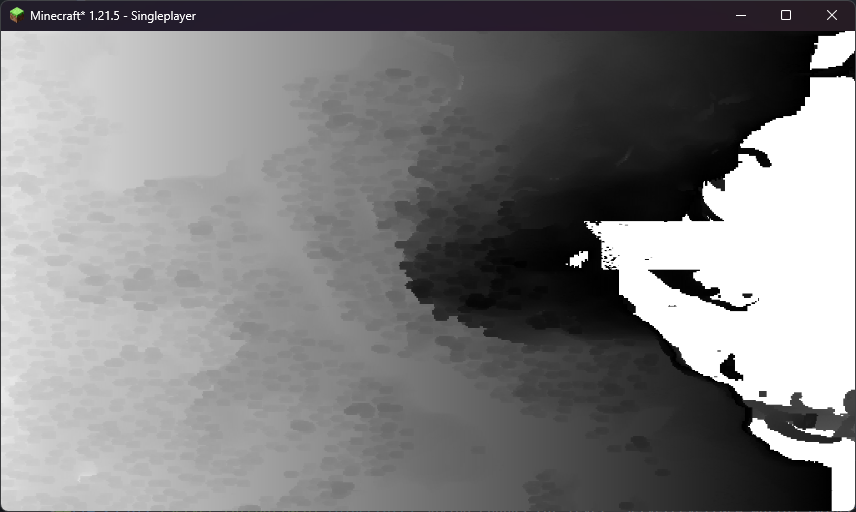
What you’re seeing here are trees! On the left, we see what’s closest to the sun, going further away as we go to the right of the map. White pixels mean “near”, black pixels mean “far”. If something is further away from the sun, it must be in shadow!
#version 330 compatibility
 uniform sampler2D colortex0; uniform sampler2D shadowtex0;
in vec2 texcoord;
layout(location = 0) out vec4 color;
void main() {  color.rgb = texture(shadowtex0, texcoord).rgb;  return;
  color = texture(colortex0, texcoord);  color.rgb = pow(color.rgb, vec3(1.0 / 2.2));}
Let’s disable our debug preview, and go implement actual shadow rendering!
Getting the Position in Shadow Space
Section titled “Getting the Position in Shadow Space”To check if a pixel is shadowed, we need to know where in the shadow map it is. We can do this by transforming the position of the pixel into shadow space. We will need the following transformation matrices:
uniform mat4 gbufferProjectionInverse;uniform mat4 gbufferModelViewInverse;uniform mat4 shadowModelView;uniform mat4 shadowProjection;To do this, we first need to determine the position of the pixel at all. We can do this using the screen texture coordinate, as well as the depth. For more information on these space conversions, see Coordinate Spaces on Iris’s developer resources!
To do these space conversions, we will make use of a function, projectAndDivide. This function applies a projection matrix and then divides by the w component, skipping clip space. Let’s place this function in composite.fsh.
#version 330 compatibility
uniform sampler2D colortex0;uniform sampler2D colortex1;uniform sampler2D colortex2;uniform sampler2D depthtex0;
/*const int colortex0Format = RGB16;*/
 uniform vec3 shadowLightPosition; uniform mat4 gbufferModelViewInverse; uniform mat4 gbufferProjectionInverse; uniform mat4 shadowModelView; uniform mat4 shadowProjection;
const vec3 blocklightColor = vec3(1.0, 0.5, 0.08);const vec3 skylightColor = vec3(0.05, 0.15, 0.3);const vec3 sunlightColor = vec3(1.0);const vec3 ambientColor = vec3(0.1);
in vec2 texcoord;
/* RENDERTARGETS: 0 */layout(location = 0) out vec4 color;
 vec3 projectAndDivide(mat4 projectionMatrix, vec3 position){   vec4 homPos = projectionMatrix * vec4(position, 1.0);   return homPos.xyz / homPos.w; }
void main() {  vec2 lightmap = texture(colortex1, texcoord).xy;  vec3 encodedNormal = texture(colortex2, texcoord).rgb;  vec3 normal = normalize((encodedNormal - 0.5) * 2.0);  vec3 lightVector = normalize(shadowLightPosition);  vec3 worldLightVector = mat3(gbufferModelViewInverse) * lightVector;
  color = texture(colortex0, texcoord);   color.rgb = pow(color.rgb, vec3(2.2));
    float depth = texture(depthtex0, texcoord).r;    if (depth == 1.0) {        return; // let's skip whats beneath us - the lighting apply logic!    }
  vec3 ndcPos = vec3(texcoord.xy, depth) * 2.0 - 1.0; // normalized device coordinates (NDC); [-1.0, 1.0]  vec3 viewPos = projectAndDivide(gbufferProjectionInverse, ndcPos); // position in view space  vec3 feetPlayerPos = (gbufferModelViewInverse * vec4(viewPos, 1.0)).xyz; // position relative to the feet of the player  vec3 shadowViewPos = (shadowModelView * vec4(feetPlayerPos, 1.0)).xyz;  vec4 shadowClipPos = shadowProjection * vec4(shadowViewPos, 1.0);  vec3 shadowNdcPos = shadowClipPos.xyz / shadowClipPos.w;  vec3 shadowScreenPos = shadowNdcPos * 0.5 + 0.5;
  vec3 blocklight = lightmap.x * blocklightColor;  vec3 skylight = lightmap.y * skylightColor;  vec3 ambient = ambientColor;  vec3 sunlight = sunlightColor * clamp(dot(worldLightVector, normal), 0.0, 1.0) * lightmap.y;
  color.rgb *= blocklight + skylight + ambient + sunlight;}
Now, shadowScreenPos gives us the proper coordinate in the shadow map that will tell us whether the part of the world we’re currently processing is in shadow!
Sampling the Shadow Map
Section titled “Sampling the Shadow Map”Recall that the shadow map contains the distance between the nearest thing and the sun/moon in a given position. If the distance is close to 1.0 (maximum), then that thing must be in shadow.
We can compare the depth in the shadow map at our shadow position’s xy component to the z component of our shadow position. If the z component (which stores depth!) is not greater than the depth, then it must be in sunlight. We can do this using the step(x, edge) function, which returns 0.0 if x < edge - and 1.0 otherwise.
#version 330 compatibility
uniform sampler2D colortex0;uniform sampler2D colortex1;uniform sampler2D colortex2;uniform sampler2D depthtex0;
 uniform sampler2D shadowtex0;
/*const int colortex0Format = RGB16;*/
uniform vec3 shadowLightPosition;uniform mat4 gbufferModelViewInverse;
const vec3 blocklightColor = vec3(1.0, 0.5, 0.08);const vec3 skylightColor = vec3(0.05, 0.15, 0.3);const vec3 sunlightColor = vec3(1.0);const vec3 ambientColor = vec3(0.1);
in vec2 texcoord;
/* RENDERTARGETS: 0 */layout(location = 0) out vec4 color;
vec3 projectAndDivide(mat4 projectionMatrix, vec3 position){  vec4 homPos = projectionMatrix * vec4(position, 1.0);  return homPos.xyz / homPos.w;}
void main() {  vec2 lightmap = texture(colortex1, texcoord).xy;  vec3 encodedNormal = texture(colortex2, texcoord).rgb;  vec3 normal = normalize((encodedNormal - 0.5) * 2.0);  vec3 lightVector = normalize(shadowLightPosition);  vec3 worldLightVector = mat3(gbufferModelViewInverse) * lightVector;
  color = texture(colortex0, texcoord);   color.rgb = pow(color.rgb, vec3(2.2));
    float depth = texture(depthtex0, texcoord).r;    if (depth == 1.0) {        return; // let's skip whats beneath us - the lighting apply logic!    }
  vec3 ndcPos = vec3(texcoord.xy, depth) * 2.0 - 1.0; // normalized device coordinates (NDC); [-1.0, 1.0]  vec3 viewPos = projectAndDivide(gbufferProjectionInverse, ndcPos); // position in view space  vec3 feetPlayerPos = (gbufferModelViewInverse * vec4(viewPos, 1.0)).xyz; // position relative to the feet of the player  vec3 shadowViewPos = (shadowModelView * vec4(feetPlayerPos, 1.0)).xyz;  vec4 shadowClipPos = shadowProjection * vec4(shadowViewPos, 1.0);  vec3 shadowNdcPos = shadowClipPos.xyz / shadowClipPos.w;  vec3 shadowScreenPos = shadowNdcPos * 0.5 + 0.5;
 float shadow = step(shadowScreenPos.z, texture(shadowtex0, shadowScreenPos.xy).r);
  vec3 blocklight = lightmap.x * blocklightColor;  vec3 skylight = lightmap.y * skylightColor;  vec3 ambient = ambientColor;  vec3 sunlight = sunlightColor * clamp(dot(worldLightVector, normal), 0.0, 1.0) * lightmap.y;  vec3 sunlight = sunlightColor * clamp(dot(worldLightVector, normal), 0.0, 1.0) * shadow;
  color.rgb *= blocklight + skylight + ambient + sunlight;}
Now - after reloading with R, you’ll notice that we have some odd patterns emerging:
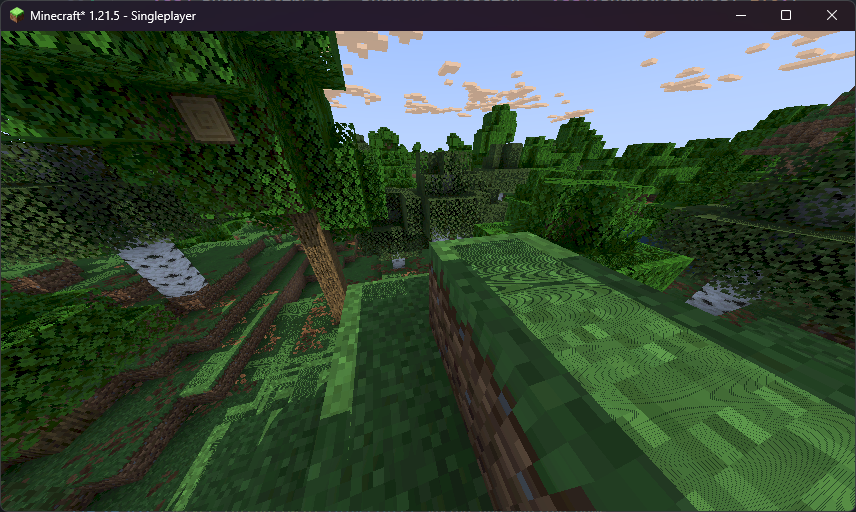
This is called shadow acne. It occurs when something ends up casting a shadow on itself, due to lack of precision in the shadow map. We can fix this by adding something known as shadow bias, where we offset surfaces slightly towards the sun to prevent them casting shadows on themselves.
#version 330 compatibility
uniform sampler2D colortex0;uniform sampler2D colortex1;uniform sampler2D colortex2;uniform sampler2D depthtex0;
uniform sampler2D shadowtex0;
/*const int colortex0Format = RGB16;*/
uniform vec3 shadowLightPosition;uniform mat4 gbufferModelViewInverse;
const vec3 blocklightColor = vec3(1.0, 0.5, 0.08);const vec3 skylightColor = vec3(0.05, 0.15, 0.3);const vec3 sunlightColor = vec3(1.0);const vec3 ambientColor = vec3(0.1);
in vec2 texcoord;
/* RENDERTARGETS: 0 */layout(location = 0) out vec4 color;
vec3 projectAndDivide(mat4 projectionMatrix, vec3 position){  vec4 homPos = projectionMatrix * vec4(position, 1.0);  return homPos.xyz / homPos.w;}
void main() {  vec2 lightmap = texture(colortex1, texcoord).xy;  vec3 encodedNormal = texture(colortex2, texcoord).rgb;  vec3 normal = normalize((encodedNormal - 0.5) * 2.0);  vec3 lightVector = normalize(shadowLightPosition);  vec3 worldLightVector = mat3(gbufferModelViewInverse) * lightVector;
  color = texture(colortex0, texcoord);   color.rgb = pow(color.rgb, vec3(2.2));
    float depth = texture(depthtex0, texcoord).r;    if (depth == 1.0) {        return; // let's skip whats beneath us - the lighting apply logic!    }
  vec3 ndcPos = vec3(texcoord.xy, depth) * 2.0 - 1.0; // normalized device coordinates (NDC); [-1.0, 1.0]  vec3 viewPos = projectAndDivide(gbufferProjectionInverse, ndcPos); // position in view space  vec3 feetPlayerPos = (gbufferModelViewInverse * vec4(viewPos, 1.0)).xyz; // position relative to the feet of the player  vec3 shadowViewPos = (shadowModelView * vec4(feetPlayerPos, 1.0)).xyz;  vec4 shadowClipPos = shadowProjection * vec4(shadowViewPos, 1.0); shadowClipPos.z -= 0.001;  vec3 shadowNdcPos = shadowClipPos.xyz / shadowClipPos.w;  vec3 shadowScreenPos = shadowNdcPos * 0.5 + 0.5;
  float shadow = step(shadowScreenPos.z, texture(shadowtex0, shadowScreenPos.xy).r);
  vec3 blocklight = lightmap.x * blocklightColor;  vec3 skylight = lightmap.y * skylightColor;  vec3 ambient = ambientColor;  vec3 sunlight = sunlightColor * clamp(dot(worldLightVector, normal), 0.0, 1.0) * shadow;
  color.rgb *= blocklight + skylight + ambient + sunlight;}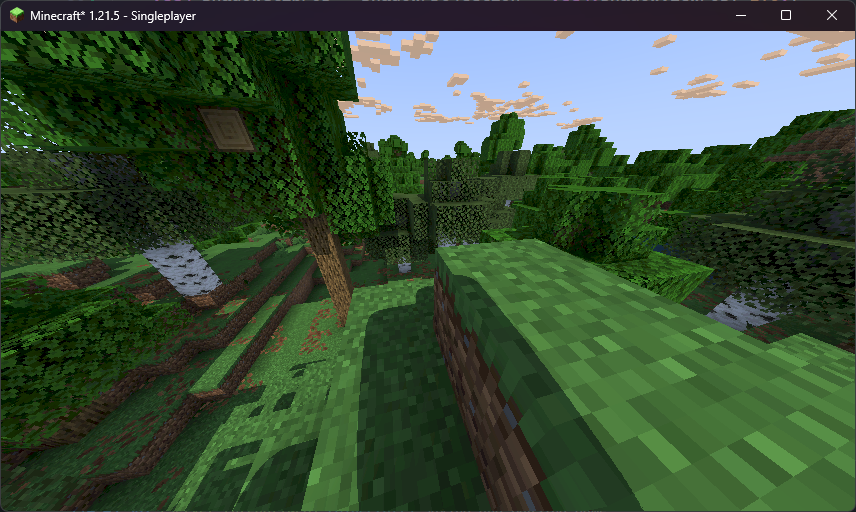
Shadow acne eliminated! But, our shadows are a bit… blobby. That’s because of our limited resolution of our shadow map - let’s fix that.
Making Shadows Sharper
Section titled “Making Shadows Sharper”The most straightforward solution is to simply increase the resolution of the shadow map:
#version 330 compatibility
uniform sampler2D gtexture;
in vec2 texcoord;in vec4 glcolor;
 // This constant can be placed anywhere - but placing it in shadow.fsh makes the most sense. // It's a special constant recognized by Iris that will determine the resolution of the shadow map! const int shadowMapResolution = 2048;
layout(location = 0) out vec4 color;
void main() {  color = texture(gtexture, texcoord) * glcolor;  if (color.a < 0.1){    discard;  }}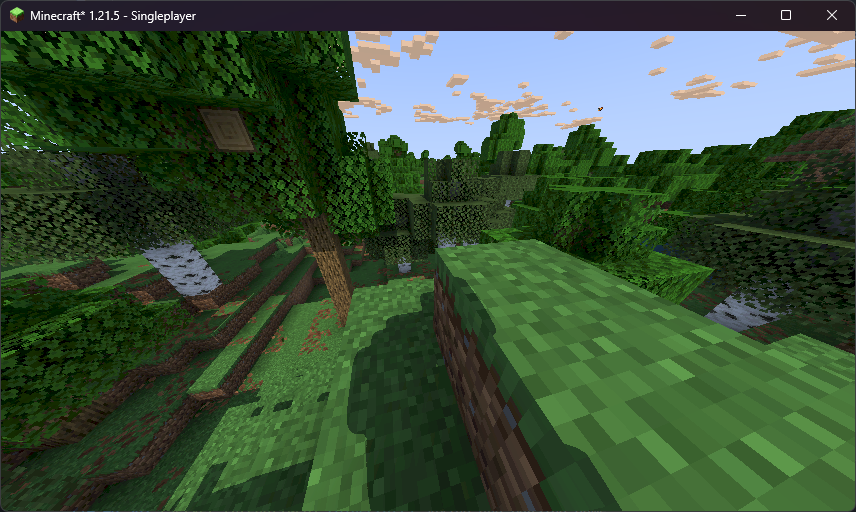
That’s better - but still not ideal. The easy way to go around this is to increase the resolution to something like 8192 - but that would stress out our GPU. There’s a smarter way to sharpen our shadows!
Shadow Distortion
Section titled “Shadow Distortion”Since stuff that is closer to us is what we can see most clearly, and thus what matters the most, we can dedicate more of the shadow map to regions closer to the camera.
We’ll squash the stuff that’s further away from the camera furhter away towards the edges. Let’s create a function to get the “distorted” shadow map coordinates from the “regular” ones. We’ll re-use this function, so let’s make use of GLSL’s #include feature!
#include practically “pastes in” the contents of the file you provide it. This is really useful for keeping your shaderpack source code tidy. Let’s make a file called shadowDistort.glsl and the reference it with #include. For the sake of organization, we’ll place it in a folder called lib.
.└── shaders/ ├── lib/ │ └── shadowDistort.glsl ├── composite.fsh └── ...Then, in both shadow.vsh and composite.fsh, we can then do:
// Do note: #include is a "pre-processor directive". These directives are processed *before* your GPU compiles your shaders.// Pre-processor directives don't need semi-colons at the end!#include "/lib/shadowDistort.glsl"Let’s open shadowDistort.glsl and write our function to squish our shadow coordinates.
In shadow clip space (shadowClipPos), all positions are between -1.0 and 1.0. As the distance from the position to the origin (where the player is) increases, we want to make that distance even greater by pushing it closer to the edge. To solve this, we can divide the position by the distance to the origin.
vec3 distortShadowClipPos(vec3 shadowClipPos) {  float distortionFactor = length(shadowClipPos.xy); // distance from the player in shadow clip space  distortionFactor += 0.1; // very small distances can cause issues so we add this to slightly reduce the distortion
  shadowClipPos.xy /= distortionFactor;  shadowClipPos.z *= 0.5; // increases shadow distance on the Z axis, which helps when the sun is very low in the sky  return shadowClipPos;}
We do not apply distortion to the z component as the origin of shadow clip space is the sun, not the player. On the x and y axes, things line up fine anyway, but on the z axis, they do not. Instead, we just half the z component, which essentially doubles the range on this axis, at the cost of precision. This is because when the sun gets low in the sky, the normal range of 255 blocks becomes noticeable.
Let’s now apply that distortion! Recall how vertex shaders can distort where we actually apply pixel colors - we’ll apply that distortion in shadow.vsh.
#version 330 compatibility
 #include "/lib/shadowDistort.glsl"
out vec2 texcoord;out vec4 glcolor;
void main() {  texcoord = (gl_TextureMatrix[0] * gl_MultiTexCoord0).xy;  glcolor = gl_Color;  gl_Position = ftransform();  gl_Position.xyz = distortShadowClipPos(gl_Position.xyz);}
Let’s take a look at the shadow map texture!
#version 330 compatibility
 uniform sampler2D colortex0; uniform sampler2D shadowtex0;
in vec2 texcoord;
layout(location = 0) out vec4 color;
void main() {  // This will show the raw shadow-map texture!  color.rgb = texture(shadowtex0, texcoord).rgb;  return;
  color = texture(colortex0, texcoord);  color.rgb = pow(color.rgb, vec3(1.0 / 2.2));}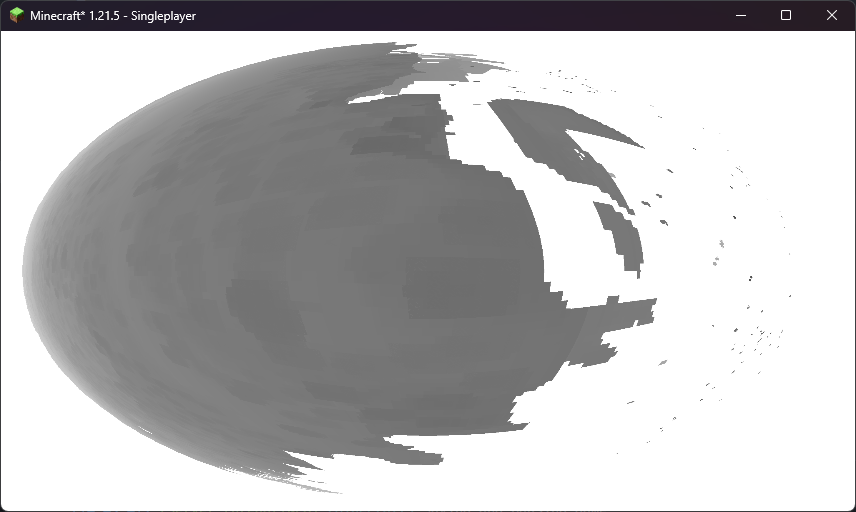
Success! Stuff in the middle of the shadowmap has been expanded to take up more space. Let’s disable our preview.
#version 330 compatibility
 uniform sampler2D colortex0; uniform sampler2D shadowtex0;
in vec2 texcoord;
layout(location = 0) out vec4 color;
void main() {  // This will show the raw shadow-map texture!  color.rgb = texture(shadowtex0, texcoord).rgb;  return;
  color = texture(colortex0, texcoord);  color.rgb = pow(color.rgb, vec3(1.0 / 2.2));}
…and apply the distortion in composite.fsh!
#version 330 compatibility
 #include "/lib/shadowDistort.glsl"
uniform sampler2D colortex0;uniform sampler2D colortex1;uniform sampler2D colortex2;uniform sampler2D depthtex0;
uniform sampler2D shadowtex0;
/*const int colortex0Format = RGB16;*/
uniform vec3 shadowLightPosition;uniform mat4 gbufferModelViewInverse;
const vec3 blocklightColor = vec3(1.0, 0.5, 0.08);const vec3 skylightColor = vec3(0.05, 0.15, 0.3);const vec3 sunlightColor = vec3(1.0);const vec3 ambientColor = vec3(0.1);
in vec2 texcoord;
/* RENDERTARGETS: 0 */layout(location = 0) out vec4 color;
vec3 projectAndDivide(mat4 projectionMatrix, vec3 position){  vec4 homPos = projectionMatrix * vec4(position, 1.0);  return homPos.xyz / homPos.w;}
void main() {  vec2 lightmap = texture(colortex1, texcoord).xy;  vec3 encodedNormal = texture(colortex2, texcoord).rgb;  vec3 normal = normalize((encodedNormal - 0.5) * 2.0);  vec3 lightVector = normalize(shadowLightPosition);  vec3 worldLightVector = mat3(gbufferModelViewInverse) * lightVector;
  color = texture(colortex0, texcoord);   color.rgb = pow(color.rgb, vec3(2.2));
    float depth = texture(depthtex0, texcoord).r;    if (depth == 1.0) {        return; // let's skip whats beneath us - the lighting apply logic!    }
  vec3 ndcPos = vec3(texcoord.xy, depth) * 2.0 - 1.0; // normalized device coordinates (NDC); [-1.0, 1.0]  vec3 viewPos = projectAndDivide(gbufferProjectionInverse, ndcPos); // position in view space  vec3 feetPlayerPos = (gbufferModelViewInverse * vec4(viewPos, 1.0)).xyz; // position relative to the feet of the player  vec3 shadowViewPos = (shadowModelView * vec4(feetPlayerPos, 1.0)).xyz;  vec4 shadowClipPos = shadowProjection * vec4(shadowViewPos, 1.0);  shadowClipPos.z -= 0.001;  shadowClipPos.xyz = distortShadowClipPos(shadowClipPos.xyz);  vec3 shadowNdcPos = shadowClipPos.xyz / shadowClipPos.w;  vec3 shadowScreenPos = shadowNdcPos * 0.5 + 0.5;
  float shadow = step(shadowScreenPos.z, texture(shadowtex0, shadowScreenPos.xy).r);
  vec3 blocklight = lightmap.x * blocklightColor;  vec3 skylight = lightmap.y * skylightColor;  vec3 ambient = ambientColor;  vec3 sunlight = sunlightColor * clamp(dot(worldLightVector, normal), 0.0, 1.0) * shadow;
  color.rgb *= blocklight + skylight + ambient + sunlight;}
Let’s take a look at how it looks now:
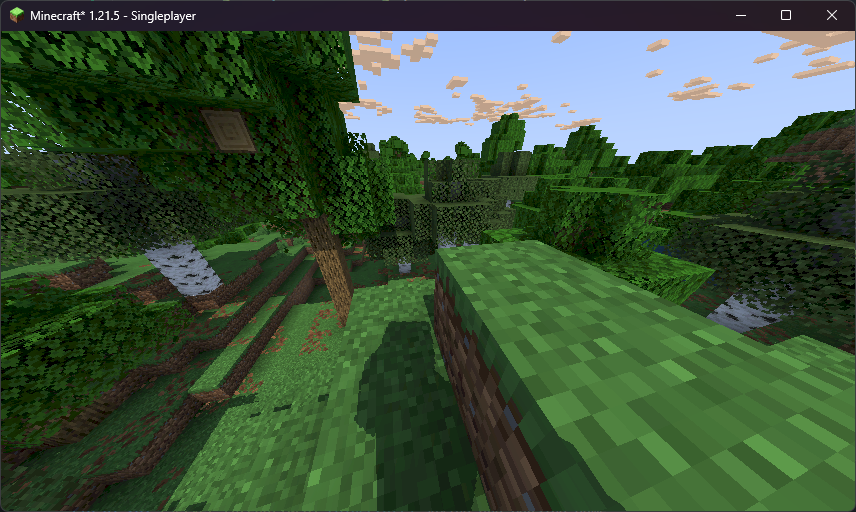
Nice and crispy! We can actually see the player’s silhouette now!
Transparent and Colored Shadows
Section titled “Transparent and Colored Shadows”Let’s take a look at how shadows are cast for stained glass.
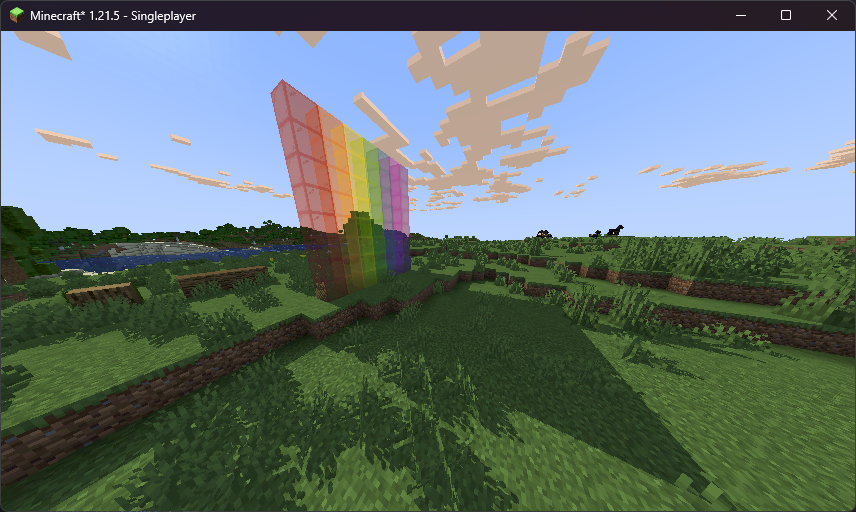
Hmm… that doesn’t look right. Stained glass is translucent, so it should be letting some light through. In our shader, we don’t really treat translucent blocks different from solid ones - we should change that!
Iris gives us a couple of shadow-map uniforms that can help us with that:
shadowtex0contains everything that casts a shadow.shadowtex1contains only things that are fully opaque and cast a shadow.shadowcolor0contains the color (and transparency information) of things which cast shadows.
Let’s add all of these to our composite.fsh so we can access them, and write a function to get a proper, colored shadow!
#version 330 compatibility
#include "/lib/shadowDistort.glsl"
uniform sampler2D colortex0;uniform sampler2D colortex1;uniform sampler2D colortex2;uniform sampler2D depthtex0;
 uniform sampler2D shadowtex0; uniform sampler2D shadowtex1; uniform sampler2D shadowcolor0;
/*const int colortex0Format = RGB16;*/
uniform vec3 shadowLightPosition;uniform mat4 gbufferModelViewInverse;
const vec3 blocklightColor = vec3(1.0, 0.5, 0.08);const vec3 skylightColor = vec3(0.05, 0.15, 0.3);const vec3 sunlightColor = vec3(1.0);const vec3 ambientColor = vec3(0.1);
in vec2 texcoord;
/* RENDERTARGETS: 0 */layout(location = 0) out vec4 color;
vec3 projectAndDivide(mat4 projectionMatrix, vec3 position){  vec4 homPos = projectionMatrix * vec4(position, 1.0);  return homPos.xyz / homPos.w;}
 vec3 getShadow(vec3 shadowScreenPos){   float transparentShadow = step(shadowScreenPos.z, texture(shadowtex0, shadowScreenPos.xy).r); // sample the shadow map containing everything
   // A value of 1.0 means 100% of sunlight is getting through.   if (transparentShadow == 1.0){     // No shadow at all - easy enough!     return vec3(1.0);   }
   float opaqueShadow = step(shadowScreenPos.z, texture(shadowtex1, shadowScreenPos.xy).r); // sample the shadow map containing only opaque stuff
   if(opaqueShadow == 0.0){     // There is a shadow cast by something fully opaque (e.g. a stone block) - we're fully in shadow.     return vec3(0.0);   }
   // contains the color and alpha (transparency) of the thing casting a shadow   vec4 shadowColor = texture(shadowcolor0, shadowScreenPos.xy);
   // We use (1.0 - alpha) to get how much light is let through, and multiply that light by the color of the thing that's   // casting the shadow.   return shadowColor.rgb * (1.0 - shadowColor.a); }
void main() {  vec2 lightmap = texture(colortex1, texcoord).xy;  vec3 encodedNormal = texture(colortex2, texcoord).rgb;  vec3 normal = normalize((encodedNormal - 0.5) * 2.0);  vec3 lightVector = normalize(shadowLightPosition);  vec3 worldLightVector = mat3(gbufferModelViewInverse) * lightVector;
  color = texture(colortex0, texcoord);   color.rgb = pow(color.rgb, vec3(2.2));
    float depth = texture(depthtex0, texcoord).r;    if (depth == 1.0) {        return; // let's skip whats beneath us - the lighting apply logic!    }
  vec3 ndcPos = vec3(texcoord.xy, depth) * 2.0 - 1.0; // normalized device coordinates (NDC); [-1.0, 1.0]  vec3 viewPos = projectAndDivide(gbufferProjectionInverse, ndcPos); // position in view space  vec3 feetPlayerPos = (gbufferModelViewInverse * vec4(viewPos, 1.0)).xyz; // position relative to the feet of the player  vec3 shadowViewPos = (shadowModelView * vec4(feetPlayerPos, 1.0)).xyz;  vec4 shadowClipPos = shadowProjection * vec4(shadowViewPos, 1.0);  shadowClipPos.z -= 0.001;  shadowClipPos.xyz = distortShadowClipPos(shadowClipPos.xyz);  vec3 shadowNdcPos = shadowClipPos.xyz / shadowClipPos.w;  vec3 shadowScreenPos = shadowNdcPos * 0.5 + 0.5;
  float shadow = step(shadowScreenPos.z, texture(shadowtex0, shadowScreenPos.xy).r);  vec3 shadow = getShadow(shadowScreenPos);
  vec3 blocklight = lightmap.x * blocklightColor;  vec3 skylight = lightmap.y * skylightColor;  vec3 ambient = ambientColor;  vec3 sunlight = sunlightColor * clamp(dot(worldLightVector, normal), 0.0, 1.0) * shadow;
  color.rgb *= blocklight + skylight + ambient + sunlight;}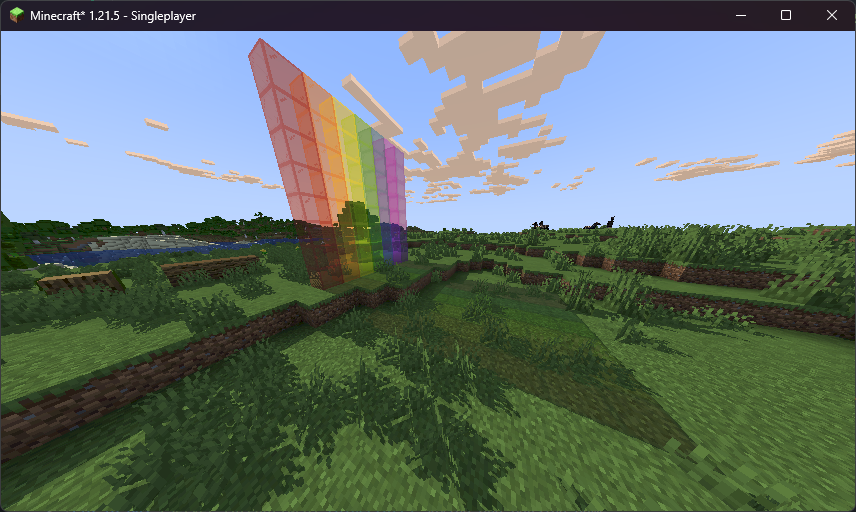
That looks about right! In the next chapter, we’ll implement fog.